Assembly Radial Array 



Access: Open this function from one of the following locations:
-
Click the
button in the
toolbar. -
Select Assembly > Copy > Assembly Radial Array from the menu bar.
Copy components in a radial array.
Create arrays of components in a radial pattern about a specified axis.
Creating an Assembly Radial Array
The image shows the Feature Guide for Assembly Radial Array.
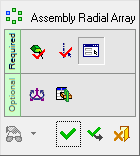
Required Step 1 
Pick the components to be copied.
Required Step 2 
Select the axis of rotation.
Required Step 3 
Set the parameters of the array. Note that a directional arrow is displayed.
Optional Step 1 
Set the offset and rotation parameters.
Optional Step 2 
The Cut Manager is displayed; select the parts to be cut.
Detailed Interaction
See Options and Results.
