Cimatron Control Panel > NC


Access: Open this function from one of the following locations:
Select NC.
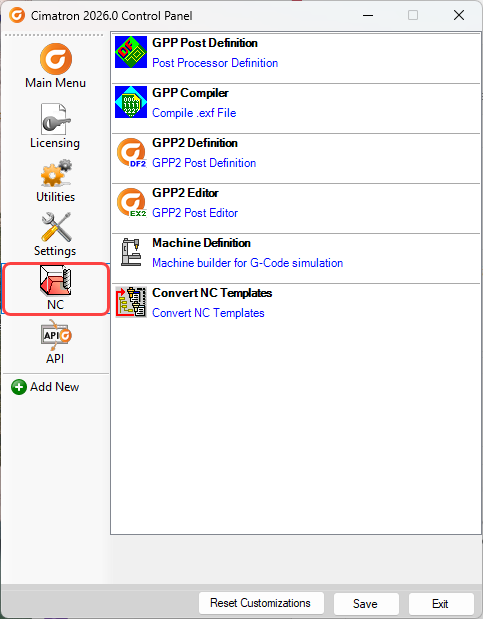
Run various Numerical Control-related applications from the NC tab of the Cimatron Control Panel (see below).
Click on the icons on the left side of the dialog for a description of each area.
|
|
|
GPP Post Definition
|
Define a specific GPP post processor.
The DFPost is one stage in the process of defining a specific GPP post processor.
|
|
GPP2 Definition
|
Open the GPP2 program to import or edit files in the programming environment that allows the development of post-processors for Cimatron NC.
|
|
GPP2 Editor
|
Open the DEF EX2 Text Editor to use the programming environment that allows the development of post-processors for Cimatron NC.
|
|
GPP Compiler
|
Compile a GPP Post Processor Program File (.exf) to create a file with the extension .dex in the folder:
...\ProgramData\Cimatron\Cimatron\2026.0\Data\It\var\post\
|
|
Machine Definition
|
The Machine Definition application enables you to "build" virtual machines that the Machine Simulator can use. This enables you to simulate the G-Code motions on a virtual machine that imitates the real machine behavior.
|
|
Convert NC Templates
|
Some NC template files will require a one-time conversion in order for the procedures and cutters to be displayed in the NC Templates Manager. To convert these templates, use the Cimatron NC Template Converter. For more, see NC Templates Manager.
|
|
When you have finished using the Control Panel, select the appropriate approval option below.
Approval Options
The following options appear at the bottom of the Cimatron
Control Panel:
Reset Customizations |
Reset
all customizations to the Control Panel. This resets the Control
Panel back to the default settings. |
Save |
Save all customizations. |
Exit |
Exit the Control
Panel. If you have customized the Control Panel and pressed Exit
before saving, you are prompted to save your changes before exiting. |
