-
Data translators for native file formats: AutoCAD, Autodesk Inventor, CATIA, Creo/ProE, SolidEdge, SolidWorks, and UG/NX.
-
Import Product Manufacturing Information (PMI) from CATIA, Creo/ProE, SolidWorks, and UG/NX.
-
Start working immediately, no matter the quality of the geometry, by automatically fixing invalid entities.
-
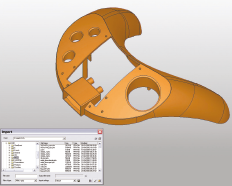
Save import settings for reuse when importing a similar file. In Cimatron's Data Interface operations, this is the ability to create customized parameter sets, where import or export settings are based on specific parameter values (a sort of DI template). This saves time by allowing you to pre-define and save parameter values for certain import or export operations, and then enabling you to recall these parameter values by selecting the appropriate setting.
For a summary of the Data Interface Import/Export formats supported by Cimatron (including their CAD version numbers), see Cimatron's Import/Export Capabilities at a Glance.
Cimatron retains the settings of the data interface (Import/Export) dialog from its last use, including the menu state (expanded or collapsed) and the tab that was opened.
For additional information, see the Cimatron Data Interface module.
|
|