Deleting a Feature
A feature can be deleted in one of the following ways:
-
Right-click a feature/folder in the Feature Tree and, from the popup menu, select Delete Feature. For a folder, this deletes all the features in the folder and also deletes the empty folder.
-
Select a face of the feature, right-click to open the popup menu and select Delete Feature.
-
Select a face of the feature and press the Delete key.
In some cases, deleting a feature will affect subsequent features. This happens when subsequent features are partially dependent on the removed feature. You will receive a dialog listing the affected features, and you can decide whether or not to proceed with the deletion. Example:Example:
The yellow feature (Extrude19) is based on a sketch created on the top face of the purple feature (Extrude12).
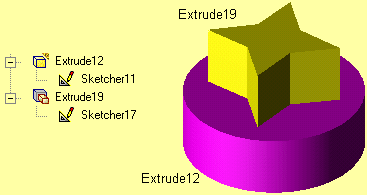
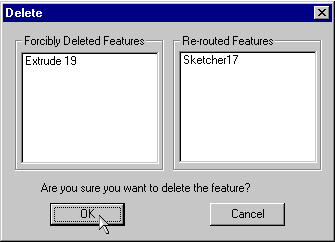
If the purple feature (Extrude12) is selected for deletion, the following dialog will appear. Extrude19 will have to be forcibly deleted because its base will disappear. Sketcher17 will be rerouted; it will still exist in the same place, but its location is no longer dependent on Extrude12.
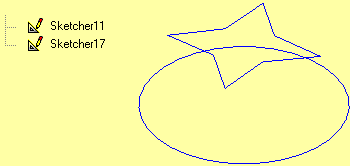
After Extrude12 is deleted, only the two sketches will remain.
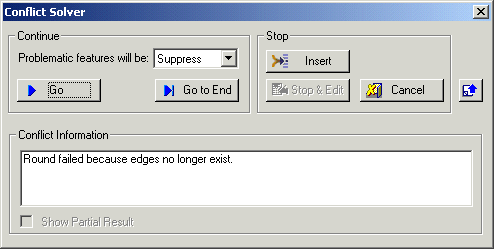
In other cases, deleting will invoke the Conflict Solver. This occurs if there are subsequent feature whose reference geometry is part of the deleted feature. Example:Example:
The Round13 feature is created from edges of Extrude12.
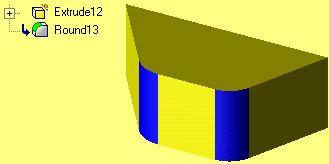
If Extrude12 is selected for deletion, the Conflict Solver will tell you what features are problematic. In this case, the Round will fail because its edges are deleted. You can decide here whether or not you want to proceed with the deletion.
Notes:
- Deleting feature permanently removes the entire feature, from the display as well as from the Feature Tree. However, can use the Undo function if you want to return the feature.
- If you want to only remove a feature from the display, but not delete it, you can use the Hide function.
- If you want to remove an object, face or curve in such a way that the Remove function is shown on the Feature Tree and can later be manipulated, use the Remove Geometry function. Remove Geometry can also be used to remove individual faces of objects, whereas the Delete function would delete the entire feature.
