Retracting the tool in +X, -X, +Y, -Y, +Z, -Z, XY, XZ, YZ, opt. in XY, XZ, YZ
This option assigns the direction in which the tool has to move away from the check and drive surfaces.
Available retracting directions
to +X, -X, +Y, -Y, +Z and -Z axis direction
Here the direction is clearly defined. From the gouging tool path point the tool retracts into the desired direction until no gouge is detected. Make sure that the direction you want to retract is collision free. e.g if you machine undercuts it doesn't make sense to retract into +Z Direction.
In XY, XZ and YZ plane
Here the tool will retract in a plane which is spanned by two directions. This can be X and Y, X and Z, and Y and Z.
Also, to determine the direction in the plane, the surface normal will be projected in this plane. This makes the surface normal flat in the desired plane. Then the tool will be pushed out from collision in this direction.
Optimized in XY, XZ and YZ
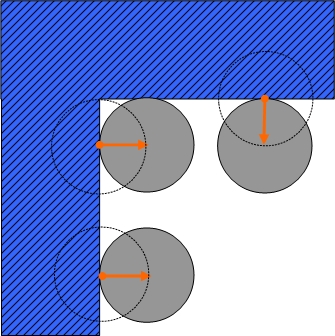
Here the tool can retract in a plane which is spanned by two directions. This can be X and Y, X and Z, and Y and Z.
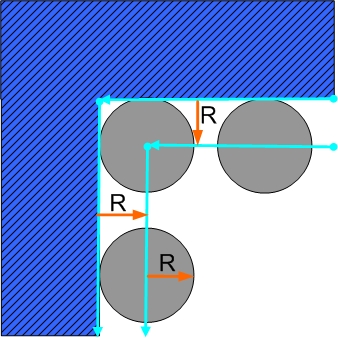
For each contour the surface contact points will be dropped onto the desired plane and so you get a 2d contour. Then the 2d contour will be offseted with tool radius and stock to leave value. The system finds the shortest distance vector to the offset and surface contact point of tool and uses this as the pushing direction.
With this method surface normal is no more used to define the direction for retract.
User defined direction
The direction to where the tool should retract can be defined by a vector. For this vector the components X, Y and Z must be set in the dialog. It is also possible to pick a line from the geometry defining the vector direction.
Example
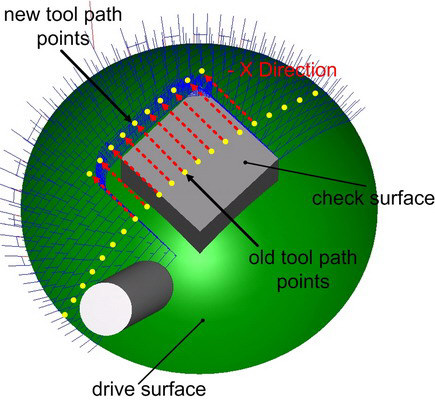
Here a gouge is detected. If you select "move tool in –X " the affected tool path points will be moved away only in –X direction until the check surface ends and the tool is able to pass.