Feature Detection - Web API
This page explains how to integrate CAD-AI Web APIs into client applications. It covers authentication, prediction API usage, request/response formats, and common troubleshooting steps.
Integration is a two-step process:
- Generate an authentication token using an API Key
- Use the token as a Bearer token to call the CAD-AI Prediction API
Prerequisites
Before starting the integration, ensure you have the following items:
-
A valid CAD-AI API Key provided by the Cimatron team
-
Internet connectivity to access CAD-AI services
-
Ability to make HTTPS POST requests (using tools like Postman, cURL, or code via REST client libraries)
-
Input CAD file ready for AI prediction
This process works for STEP and SAT
- For STEP, the Face ID should be present as integer in ADVANCED_FACE label.
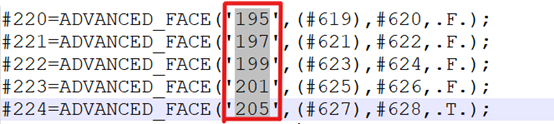
- For SAT, same IDs are expected to store with attribute: ATTRIB_XACIS_NAME
1. Authentication – Generate Auth Token
API Key
Use the API key provided by Cimatron to generate an authentication token.
Note: Keep the API key secure. Do not expose it in public repositories or client-side code.
Authentication API Details
-
URL - https://cimatronauthapi.cimatron.com/api/Auth/generateAuthToken
-
HTTP Method - POST
-
Header - Content-Type: application/json
-
Request Payload
{
"apiKey": "[ADD API KEY HERE]"
}
Authentication Response
On successful authentication, the API returns a token.
Example Response:
{
"token": "eyJhbGciOiJIUzI1NiIsInR5cCI6IkpXVCJ9..."
}
Use this as a Bearer Token for subsequent API calls.
Note: Generated Bearer Token will expire in 5 mins
2. Prediction API – CAD-AI Feature Recognition
Prediction API Details
- URL - https://cimatronfeaturerecognition.cimatron.com/api/v1/AI/Predict
- HTTP Method - POST
- Authentication - Bearer Token (generated from Auth API)
Required Headers
- Authorization: Bearer <AUTH_TOKEN>
- Content-Type: multipart/form-data
Request Input
- The API expects a file as input (.SAT,.STEP, .STP)
- Supported CAD file formats should match CAD-AI specifications
- File is sent as multipart/form-data
Prediction API Response
The API returns AI-based feature recognition results.
Typical response includes:
- Detected features
- Feature types
- Confidence scores
- Additional metadata
Response structure may evolve based on CAD-AI model updates.
JSON Format
{
"probabilities":
{
FaceID :
{
FeatureLabel : Confidence value
}
},
"face_labels":
{
FaceID : FeatureLabel
},
"label_list": [ FeatureLabelSequence ],
"face_groups":
{
FeatureLabel :
{
GroupIndex : [FaceIDs]
}
},
"face_type":
{
FaceID : FaceTypeIndex
}
}
Face Type Labels:
0 – Undefined
1 – Wall
2 – Floor
3 – Feature Fillet
Integration Flow Summary
- Obtain API Key from Cimatron
- Call >Auth API to generate token
- Pass token as Authorization: Bearer <token>
- Call Prediction API with CAD file input
- Parse and consume AI prediction results
