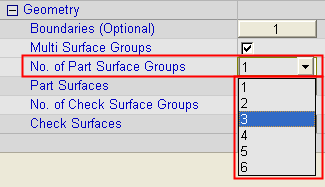
Multi Surface Groups

Access: Open this function from the following location:
-
Multi Surface Groups selection mode:
Either press the button
in the Work Mode Dialog
(if you are in Wizard Mode),
or display the Geometry
parameters in the parameter
tables.
button
in the Work Mode Dialog
(if you are in Wizard Mode),
or display the Geometry
parameters in the parameter
tables.
The Geometry Table is displayed:
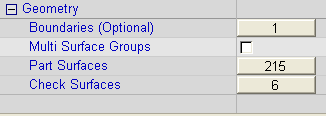
Select the checkbox next to the Multi Surface Groups option, and you are ready to start selecting part and/or check surfaces.
Whether roughing or finishing, you select a group of part surfaces to cut. Finishing procedures also allow for selecting check surfaces. In any of these cases, Cimatron allows for the selection of multiple groups. The Multi Surface Groups option enables you to define up to 6 Part Surface Groups and up to 4 Check Surface Groups.
For each group, you can enter a different surface offset. For example, when roughing, you can leave extra stock in areas that will be machined later. When finishing, you can apply a small amount of extra offset needed for clearing an area, or adding details such as mold vents.
This option is available in the following procedures: Rough, Finish, Pencil and Cleanup procedures.
Multi Surface Groups option unchecked:
|
|
If the Multi Surface Groups option is not checked, only 1 Part Surface Group and 1 Check Surface Group are created. This example table shows:
|
Multi Surfaces Groups option checked:
|
|
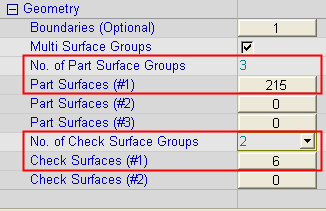
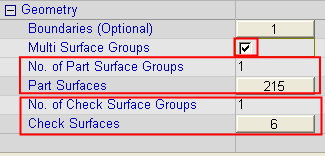
If the Multi Surface Groups option is checked, the following additional parameters are displayed: No. of Part Surface Groups and No. of Check Surface Groups. These parameters enable you to define up to 6 Part Surface Groups and up to 4 Check Surface Groups. This allows you to define different offsets for each group of surfaces (under the Tolerance and Surface Offset branch). This example table shows the situation immediately after the Multi Surface Groups checkbox is checked; the additional parameters are displayed, initially showing:
Define part/check surface groups as required. |
Example: Defining Part and Check Surface GroupsExample: Defining Part and Check Surface Groups
|
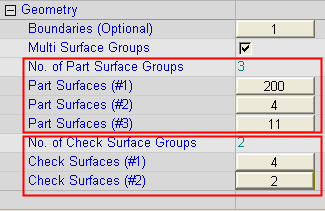
Using the above table as an example, 3 part surface groups and 2 check surfaces are defined. |
Initially, all the 215 part surfaces belong to the same part surfaces group (#1) and all 6 check surfaces belong to the same check surface group (#1). |
|
|
|
|
Once the part and check surfaces are arranged in different groups, each of these groups can be defined with different offsets (under the Tolerance and Surface Offset branch). |
|
|
|