How to postprocess
After all the toolpath and part generation steps are completed, and ALL the processes that are in it are calculated ( ), you will need to postprocess the toolpath to obtain the programs in a language that your controller can understand.
You have to take into account that you ALWAYS postprocess ALL the processes that are inside a TOOLPATH. You will not be able to postprocess a process independently (only if there is a single process in the toolpath).
Postprocess a toolpath
Select the toolpath, or any of the entities that are in it, by selecting its name and then click the Postprocess buttonPostprocess button
The following dialog is displayed:
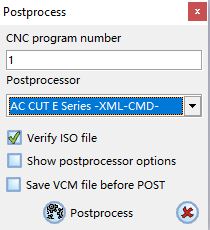
Define the number that you want to assign to the program and set the type of postprocessor.
Click PostprocessPostprocess  to start the postprocessing.
If you have marked the Save VCM file before POST checkbox, the VCM file will be saved before executing the postprocessing process.
It is also possible to postprocess a single geometry or a single process. Select the geometry or process and right click with the mouse to display the submenu.
Click PostprocessPostprocess and proceed normally.