How to order by phases / by geometry
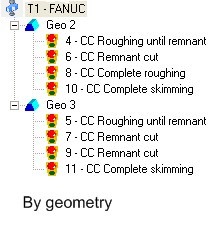
When you work with Cimatron and create parts and proceses that depend on them, all your work is sorted in chronological order in a tree, in the Toolpaths Manager.
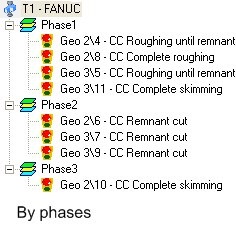
This sorting method is set by default (Order by Geometry) but there is another method of sorting your work: Order by Phase.
A phase is a numeric value that is assigned to your process and appears in your technology table.
Depending on the path type that you are defining, Cimatron assigns a phase by default, which can be modified at any time. Notice the phase number that is assigned by default to each path type in the following table:
| Path Type | Phase |
| Complete roughing | 1 |
| Roughing until remnant | 1 |
| Remnant cut | 2 |
| Complete skimming | 3 |
| Skimming until remnant | 3 |
| Remnant skimming | 3 |
Press on  �to sort your work by
phases. Thus you can classify your processes by work type.
This means that you could put together all the
“Roughing until remnant” processes of your work
and send them together to be machined all night. The next
day you could do the “Remnant cut” processes
which require your presence.
�to sort your work by
phases. Thus you can classify your processes by work type.
This means that you could put together all the
“Roughing until remnant” processes of your work
and send them together to be machined all night. The next
day you could do the “Remnant cut” processes
which require your presence.
|
|
|
|