No Core Cut
This step will only be available if the job to be done is a No Core Cut (Pocketing) process.
Remember also that if you want to do a Pocketing process, both the entry motion and the No Core Cut start point must be defined. If not, this step will be skipped and you will not be able to define the parameters (you will jump from prior to subsequent step).
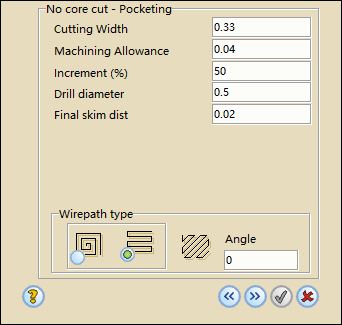
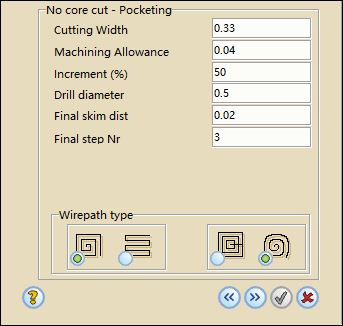
The following parameters are required to define a Pocket process:
- Cutting width: Diameter of the wire plus the gap.
- Machining allowance: Indicates the material to be left on the contour for the trim cuts.
- Increment: Defines at which percentage two adjacent cuts must overlap each other. With 50% there is the maximum security that there are not any small pieces falling down
- Final skim distance: apart from the trim cuts, it is possible to define a skim cut for the spiral wirepath in order to get the best machining accuracy before starting the trim cuts. A value of 0.02 mm is recommended.
- Final step number: Number of times that the wirepath will follow the contour shape at the end of the pocketing routine and before the skim cuts.
- Drill diameter: Diameter of the threading hole.
- Wirepath type: You can choose between linear or spiral wirepath. click the desired icon.
- Angle: This parameter is only available if you select the linear wirepath type. It will define the direction of the wirepath.
- Spiral type: This parameter is only available if you select the spiral wirepath type. The one on the right side will define a classical spiral or an the other one will create an offset type wirepath.
The pocketing step is finished. Click  to go to the next step or
  to exit from the Wizard without saving data.
