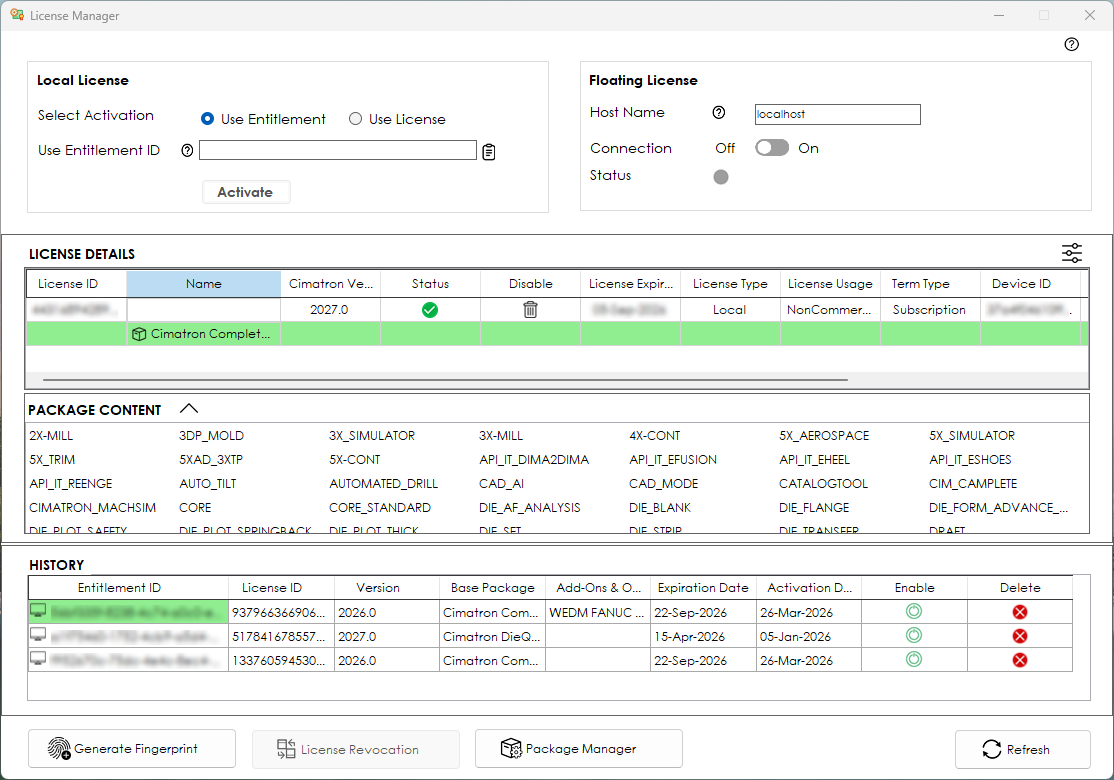
The Cimatron License Manager is the local license administration tool and is used on a Cimatron PC to activate an entitlement or license file, or to connect to a License Server to be able to claim a floating license.
When you use (add or select) your Entitlement ID in the License Manager, you will be able to see the details of the license that is associated with that ID, and everything that is packaged in that license. The content of all active licenses can be reviewed to ensure you have the capabilities you need for the your task.
Floating licenses that were borrowed from a License Server can be returned using the License Manager, and licenses that are locked to a computer can be revoked when no longer required on this machine and reactivated on another computer.
Click Windows > Cimatron 2027.0> Cimatron 2027.0 Control Panel > Licensing tab > License Manager.
Select any activated license to display the License Details pane. The base package is shown in the first row, with any purchased add-ons shown as children of the base package.
Click any of these rows to show the related content (specific modules) in the Package Content section.
Information about each license appears in the columns of the table. Hover over the status icon to see information about the license. If the license is not valid, the status information will display anything that may be wrong with the license.