Add Wedge 



Access: Open this function from one of the following locations:
-
Select Mold Design > Insert > Add Wedge from the menu bar.
-
Select Die Design > Insert Tools > Add Wedge from the menu bar.
-
Select Insert > Add Wedge from the Mold Design Guide or Die Tool Design Guide (DieDesign).
Add a wedge to a solid object to lock it in position. A cutting object can also be selected.
Add Wedge is a function used
for automating mold insert design. The wedge serves to hold it under the
cavity block without requiring a fastener. This function has many options
that help you create either a full or partial wedge based on any possible
insert shape, either applying custom shapes (box, circle, enclosing polygon,
etc.) or manually defining a wedge's placement along individual edges.
It also features a built-in cutting object that allows you to create a
matching pocket in the mold cavity.
See Insert
Tools for an introduction to inserts.
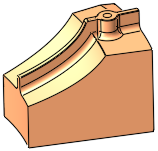
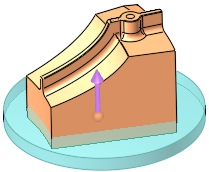
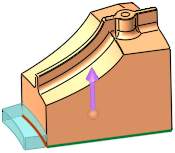
Wedges can be added globally or locally; see the examples below:
|
No Wedge |
Global Wedge: Circle |
Local Wedge: Edge |
|
|
|
|
General Interaction
The following is the Feature Guide for Add Wedge.
|
|
|
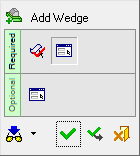
 Tip: You can open the Feature Guide at any time by right-clicking the mouse in the graphic display area.
Required Step 1  : Pick the 2D planar face to which the wedge is to be added.
Required Step 2  : Set the parameters.
Optional Step 1 : Set the cutting object parameters for the wedge.
Detailed Interaction
See Options and Results.
