Export to Part 


Access: Open this function from the following location:
-
Select File > Export > Export To Part from the Part menu bar.
Export entities to a new part file.
Export the currently open Cimatron file, or specific entities within the file, to a new Cimatron Part file. The default export folder is defined in the Preferences.
Notes:
-
Additional Import/Export operations are available, either between Cimatron files or between Cimatron and external file formats (file formats of a different vendor). For the latter operation, the Data Interface environment provides numerous options to perform this task.
-
For information regarding associativity in import/export operations in the Part application, see Associativity.
General Interaction
The following is the Feature Guide for Export to Part.
|
|
|
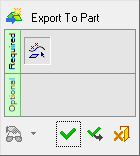
 Tip: You can open the Feature Guide at any time by right-clicking the mouse in the graphic display area.
Required Step 1  : Pick the entities to be exported.
Detailed Interaction
See Options and Results.
