Z-Top by / Z-Bottom by: Manual / Entities
These parameters enable setting the Z Limits Manually or by Entities (which includes by Criteria). The Z-Top by and Z-Bottom by parameters work similarly.
The following dropdown options are available for Z-Top by and for Z-Bottom by:
|
Manual |
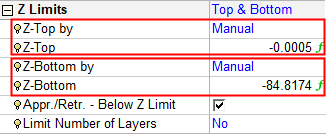
Set the Z Limits manually. In this case, only the relevant parameters are displayed - Z-Top or Z-Bottom. |
|
Entities |
Set the Z Limits by selecting entities or by defining relevant criteria for entities to be selected for Z-Top or Z-Bottom. In this case, additional parameters are displayed; see below. Pick entities. Select Z limits by criteria (by a plane in a specific set, or by a point in a specific set). Select Z limits (minpz or maxpz) from a group of surfaces inside a set, or a set of surfaces of a specific color (by criteria). |
|
Z Limits - Manual setting: |
Z Limits - Criteria setting: |
|
|
|
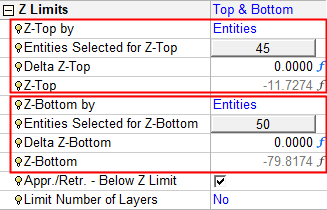
When the Entities option is selected for Z-Top by or Z-Bottom by, the following relevant additional parameters are displayed:
|
Entities Selected for Z-Top
Entities Selected for Z-Bottom |
An adjacent value field shows the number of entities that confirm the selection. The initial value is 0. Click this value button to display the following parameters:
|
||||||||||||
|
Delta Z-Top
Delta Z-Bottom |
This value is used as the Z-Top/Z-Bottom parameter and the actual Z-Top/Z-Bottom parameter value is grayed out. The original value of Z-Top/Z-Bottom is kept by the system and used if you revert back to the Manual option. |
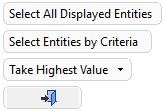

Popup Operations
In addition, you can right-click to open the following entity selection popup menu:
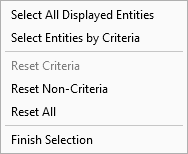
Options:
|
Select All Displayed Entities |
Pick all the displayed entities. |
|
Select Entities By Criteria |
Pick entities by criteria. This displays the criteria selection dialog. This enables you to pick a group of entities based on colors, sets, etc. |
|
Reset Criteria |
Reset (clear the selection of) the entities selected by criteria. |
|
Reset Non-Criteria |
Reset (clear the selection of) all entities not selected by criteria. |
|
Reset All |
Reset (clear the selection of) all entities. |
|
Finish Selection |
Ends the selection mode and closes the dialog. |
