General Preferences > Drawing Default Save Mode

Access: Invoke this function from one of the following locations:
-
Select the Preferences button
 from the Quick Access Toolbar, or
 -
Select Tools > Main Tools > Preferences from the menu bar.
Navigate to General > Drawing Default Save Mode.
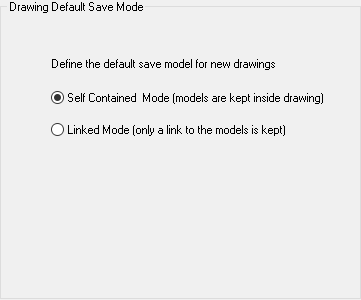
Define the default save mode for new drawings.
The Drawing Default Save Mode dialog is displayed.
Interaction
Set the parameters:
|
Self-Contained Mode |
When saving a new drawing, the relevant models are saved within the drawing. This is the default option. |
|
Linked Mode |
When saving a new drawing, links to the relevant models are saved within the drawing. This reduces the file size of drawings. |
See Saving a Drawing for additional information on these save modes.
Press the appropriate approval option.
