Tool Trajectory Parameters: Surface Milling  > Finish Mill By Limit Angle
Mill horizontal and/or vertical areas (divided by a slope angle) using different machining technologies.
Notes:
-
Select the Horizontal Areas and Vertical Areas checkboxes to display additional parameters.
-
If multiple cutters are defined for the procedure (in the Cutters & Holders parameter table), additional overlap parameters are displayed in the Tool Trajectory table. These parameters define the type of overlap (if any) between the tool pass of one cutter and that of another cutter. These overlap parameters are Horiz. Cutters Overlap and Vert. Cutters Overlap.
Tool Trajectory parameters
The Finish Mill By Limit Angle > Tool Trajectory parameter table branch enables you to define the level of control over its use and over the display of the parameters in the branch. The following branch options are available: Basic and Advanced - Basic is the default option.
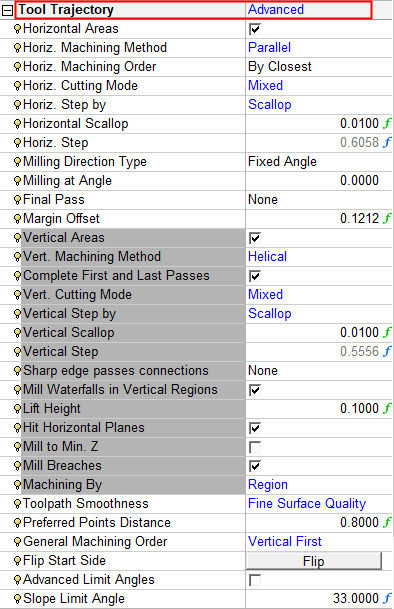
Branch option: Advanced
For a parameter description, click on a parameter in the dialog image below.
Depending on your parameter settings, some parameters may not be available or other parameters may be displayed.
Note: For clarity, all Tool Trajectory branch parameters associated with vertical machining are highlighted in dark gray.
|
|
|

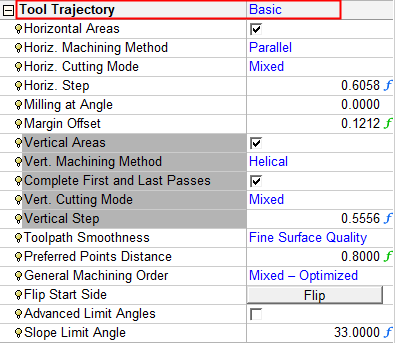
Branch option: Basic
The Basic option is the default option and displays the following parameter and enables minimal control over parameters.
For a parameter description, click on a parameter in the dialog image below.
General Notes about Parameter Tables.
Examples:
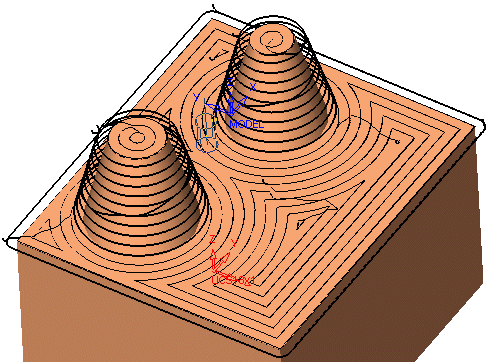
Mill horizontal area using spiral technology:Mill horizontal area using spiral technology:
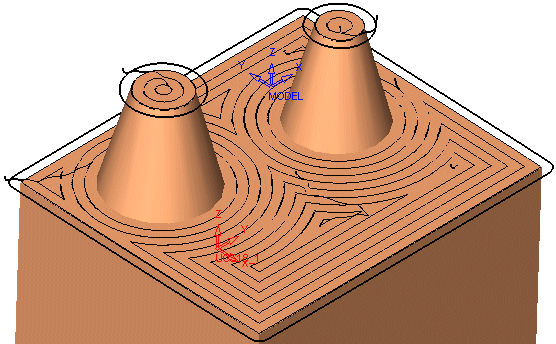
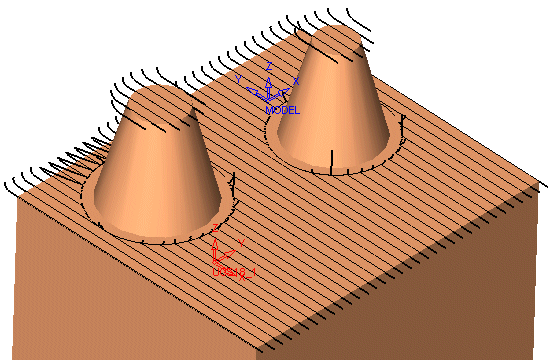
Mill horizontal area using parallel technology:Mill horizontal area using parallel technology: