Stretch 



Access: Open this function from the following location:
-
Select Solid > Warp > Stretch from the menu bar.
Stretch or shrink an object (and wire bodies) along a vector relative to a reference plane.
This function enables stretching and compressing any type of object or objects (such as, solid, skin, curve, composite and so on) under specific conditions along a predefined vector. Entire bodies or partial body regions can be stretched or shrunk.
General Interaction
The following is the Feature Guide for Stretch.
|
|
|
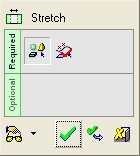
 Tip: You can open the Feature Guide at any time by right-clicking the mouse in the graphic display area.
Required Step 1  : Select the object or objects that you want to stretch or shrink along a vector relative to the reference plane.
Required Step 2  : Define the stretching region and set the required parameters.
Detailed Interaction
See Options and Results.
