|
|
Gouge Check Off
- Copy and edit the procedure.
Unmark the Gouge Check option.
Note that the Maximum Angle parameter no longer exists.
Set the Preferred Angle to 5.
Unmark the Maintain Tilt option.
 .
.
- Save & calculate the procedure.
- Enter the Navigator.
Note that in layers that do not need any tilt, the cutter moves with no tilt angle.
The system calculates the areas that require a tilt angle (it performs a 3X gouge check calculation) and sets the Preferred angle in these areas. The system does not ensure that using this angle will not cause any gouging. It is the user's responsibility to verify that the set preferred angle does not cause gouging.
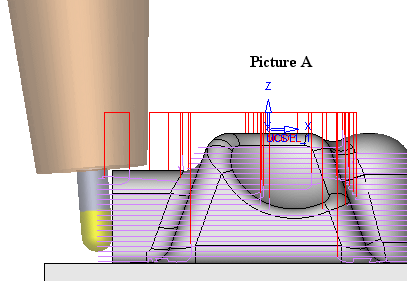
In picture A, the system detects that a tilt angle is required to prevent holder gouge and tilts the cutter by the constant angle of 5 degrees. (In this case the holder did not gouge the part.) The 5 degree tilt was enough to prevent the gouging.
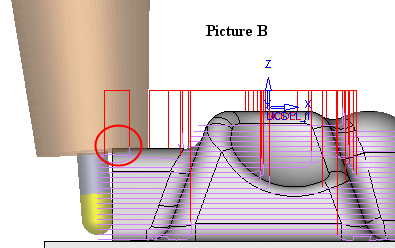
In picture B, the system detects that a tilt angle is required to prevent holder gouge and tilts the cutter by the constant angle of 5 degrees. In this case, the holder gouges the part. The 5 degree tilt was not enough to prevent the gouging.
Gouge Check Off (unmarked) may be used for simple cases where the user can easily know what should be the appropriate tilt angle for optimized machining. In this case, only a 3X gouge check is performed. It is recommended to use the Machine Simulator to confirm the results.
The advantage of using this option is shorter execution time. The toolpath is generated with only two tilt angles: no tilt or preferred value.
Smooth transition between these two modes is performed. Tilt plane is optimized internally; however, holder gouge is not checked and it is the user’s responsibility to use the Machine Simulator to confirm the results.


