|
|
Divide
Both the Trim and Cut options are used in this section.
-
First, the two faces are trimmed. The Faces/Trim function is used to cut faces of open or closed objects.
-
The part is then prepared for the solid cut operation (the three separate objects (faces) are stitched together into one object).
Import
-
Open a New Part File.
-
Select File > Import > From Part > Assembly, and open the Mirror.elt file. This file is located in the following folder and can be accessed via the Cimatron Explorer:
\\Cimatron_Documents\Tutorials Cimatron_2025.0_Workfiles\Design
The following two faces are displayed on the screen:
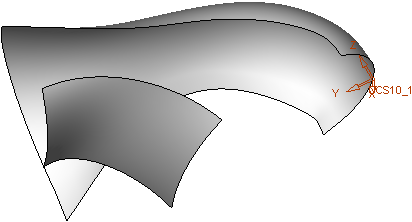
-
Click OK in the Feature Guide.
-
Enter the Sketcher. The XY plane is set as the default plane.
-
Rotate to Top View and draw a sketch with the following dimensions:
Use the Manual PreviewManual Preview option.
- Click the Automatic Preview Automatic Preview
 button (in the Sketcher General Toolbar) .
 - Create the sketch.
- Press the UpdateUpdate
 button when the sketch is fully dimensioned (purple).
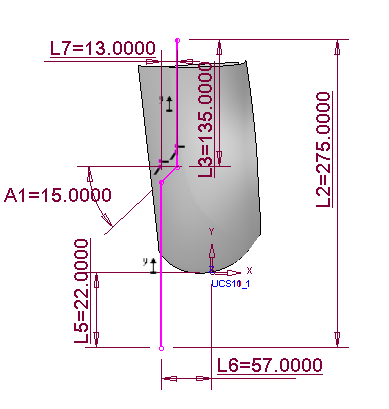
- Click the Automatic Preview Automatic Preview
- Exit the Sketcher.


