|
|
Shank and Holder Use
Shank and Holder Use Step 1
-
Copy and paste the first procedure.
-
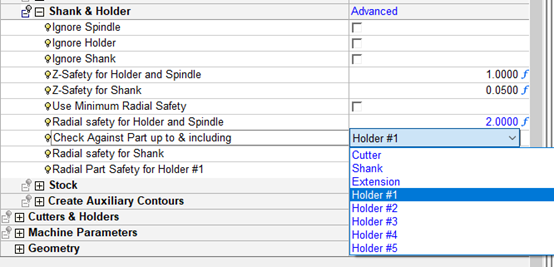
Change the Shank & Holder option from Ignore to Use.
-
Calculate the procedure.
The option Use (no other parameters are shown) uses the cutter to limit machining, however, does not calculate the minimum clear length or un-machined areas. -
The hidden parameters behind this option are as follows: (To view these default settings, select the Advanced option and then click Access.

-
There is a difference from previous versions of Cimatron where parameters were used with all their (understanding) limitations
Previous versions: