|
|


Start a New Project
Start a New Project
-
Click the New Mold Setup WizardNew Mold Setup Wizard
 to start a new Mold project.
-
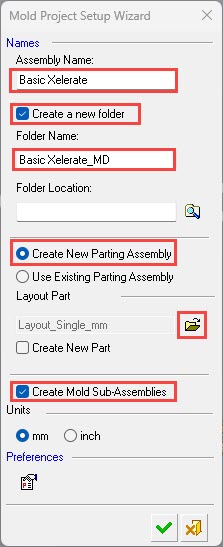
Name the main assembly, Basic Xelerate.
-
Mark the Create a New Folder checkbox to create a folder to place the main assembly.
-
To load a predefined layout part, click the Browse Folder button.
-
Select the part, Layout-2-Cav-no_mirror_mm.eltLayout-2-Cav-no_mirror_mm.elt.

-
Click Select.
Note that you can either Create a New Parting Assembly or Use an Existing Parting Assembly.
-
-
Mark the Create a New Parting Assembly button.
-
Mark the Create Mold Sub-Assemblies checkbox to create the mold sub-assemblies.
-
-
Click OK.
