|
|
Step 6 - Advanced Collision Checking
Regular collision checking is calculated on surface points (TP-Nodes). This may lead to minor gouges with the check surfaces.
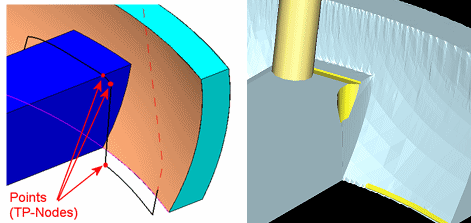
The images above show what may happen while the cutter is moving from the bottom point to the ones above. In some situations, it can gouge the corner. (This picture is performed with Check Surface Offset = 0.)
-
Duplicate the procedure and edit it.
-
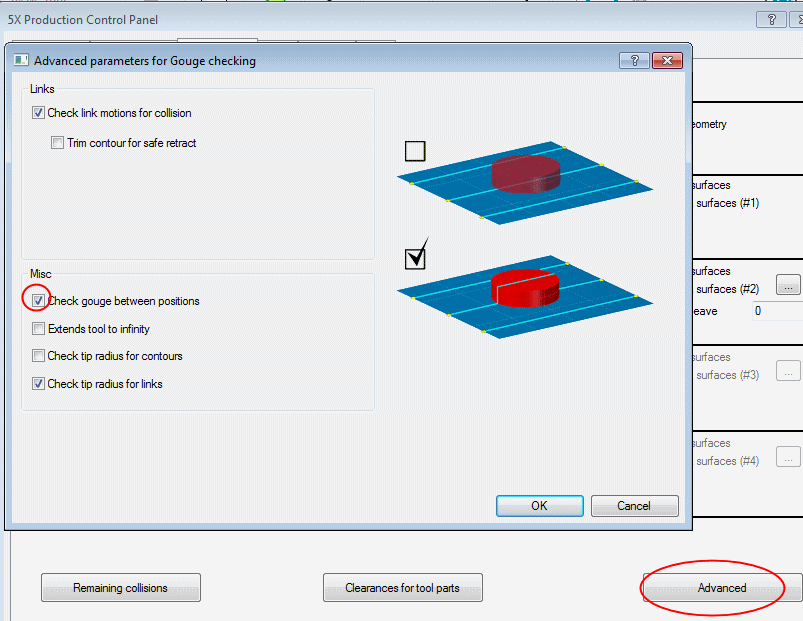
Open the dialog and click the Gouge Check tab.
Ensure that the Check Gouge Between Positions checkbox is marked.
-
Click OK and Save & Calculate the procedure.
-
Examine the results. Compare with the previous procedure.
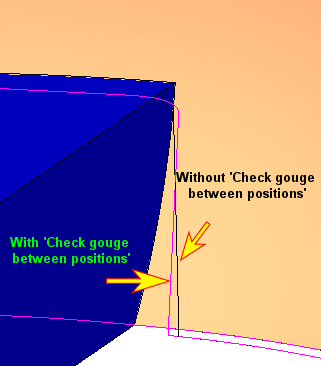
The system added TP-Nodes between the original ones in order to create a gouge free motion when moving around the check faces obstacle.


