Machining Coordinate System (MACSYS) 

Access: Open this function from one of the following locations:
Edit MACSYS:
-
Select NC Process > Model > Edit MACSYS from the menu bar.
Edit NC Setup:
-
Select NC Edit > Change Parameters > Edit NC Setup Parameters from the menu bar.
-
Right-click and select Edit > Edit NC Setup Parameters from the popup submenu.
The MACSYS defines the orientation of the part (to be machined) on the machining center. The Setup is defined parallel to a predefined UCS.
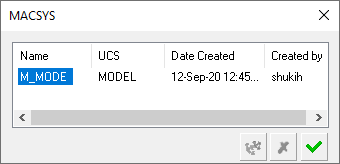
If the model contains more than one UCS, you can redefine the MACSYS by clicking on the UCS name, then clicking the UCS button  . You can then select the UCS from the dropdown list, or select it manually on the screen.
Note: The MACSYS can only be edited if a toolpath folder has not yet been defined in the NC file; you can rename the NC UCS and select a different UCS for it. However, once a toolpath folder has been defined in the NC file, you cannot change the NC UCS.
