2.5 Axes  > VoluMill Pocket
  : Creating Multi-Height Pockets



Access: Open this function from the following location:
Select a technology from the Procedure Parameter Table (2.5 Axes as the main selection and Volumill Pocket as the subselection).
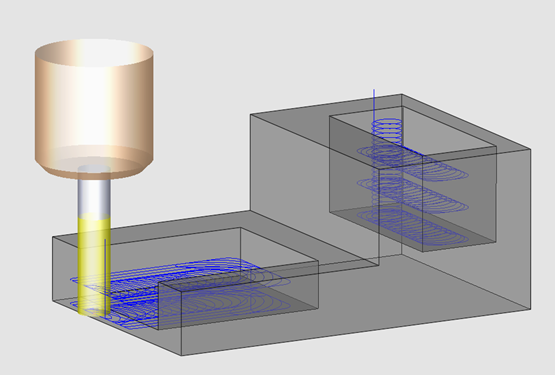
Cimatron can machine multiple pockets having multiple heights in a single procedure. Using Cimatron's enhanced functionality of the VoluMill™ technology, individual height parameters can be set for multiple pockets in one procedure, eliminating the need to create individual procedures for each pocket.
|
A single VoluMill Pocket procedure applied on two pockets with different heights. |
|
|
General Interaction
-
Select a technology from the Procedure Parameter Table (2.5 Axes as the main selection and Volumill Pocket as the subselection).
-
Pick a geometry.
-
Pick contours.
-
Pick relevant edges and set the appropriate Tool Trajectory parameters.
-
Save & calculate the procedure.
-
Use the Navigator to see the machining order.
Detailed Interaction
See Options and Results.