|
|
Actions 2
-
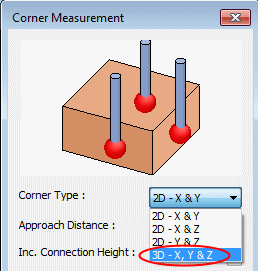
The Corner Type combo list lets you decide if the measurement is done in 2D in one of the main planes or in a 3D one.
Modify to see the difference.
Set it as 3D - X, Y & Z.
-
The Distance From Corner is how far the measuring points are from the corner in all directions.
-
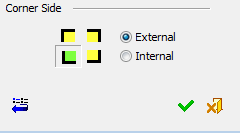
The Corner Side settings at the bottom of the dialog determine if the measurement is on an Internal or External corner.
-
The YELLOW figure shows the corner location from Top view, where GREEN shows the selected one.
Modify by clicking and observe the change in the arrows directions.
-
-
Click OK.
-
Back in the procedure grid, expand the Action parameter branch.
Some of the buttons will show Active. This is due to prior use (Cimatron will keep the last behavior). To disable it, click on each and unmark all check boxes.
Different cycles can be used for different purposes. The difference is in the Action that is taken. Different actions will result in a different output in the machine program.
Let us suppose that the purpose of this measurement is to set the part zero (Home) on the highest point above the measured one. On the machine itself, the operator will set an approximated part zero. Run the procedure as a program and let it set the exact point.


