|
|
Actions 4
-
Edit the Hole measurement procedure and go to Action.
Click on the Cutter Compensation button to open the dialog.By activating this, the cutter radius in the machine will be compensated by the difference of the measured dimension to the nominal.
The Cutter to Compensate button opens the cutter table to select the cutter that milled the measured feature.
Since the Hole cycle measures horizontally, the only active option is to Adjust Radius. If it were a downwards measurement cycle, like the first Point measuring procedure defined, it would have been possible to Adjust Length only. - Check the Adjust Radius option and click OK.
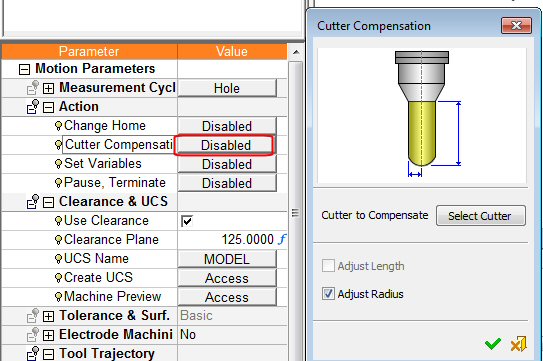
Notice that this action is now Active.It is possible to set more than one action to a single measurement procedure. For example, in addition to the cutter compensation, it needs to store some measured values in the machine parameters to be somehow used later on along the program run.
-
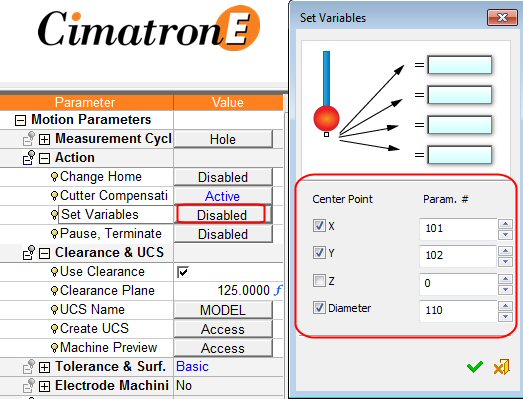
Click the value (Disabled) next to the Set Variables option.
A Hole cycle measures the hole diameter and its center coordinates. The check boxes set which value to store into the Param. # on the opposite side. Whatever is typed in the Param. # fields varies between the different controls. It is advised to consult with the post developer and decide upon agreed entries.
The Set Variables dialog for the other measuring cycles will look different. It depends on the measured values. The operation logic remains the same.