|
|
Connection
A 5-axis connection will be defined between two NC procedures (via a safety clearance) using an automatic retract and approach definition.
-
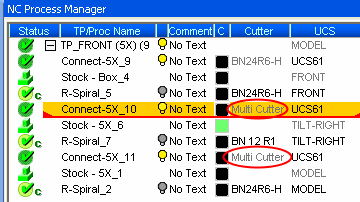
Highlight the Toolpath and create a Connection procedure.
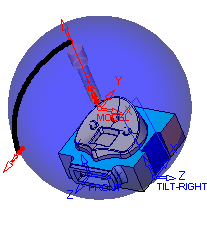
Using the Model UCS, the Connection procedure takes up unnecessary space above the geometry. A new UCS will now be created in the center of the geometry to enable a more efficient toolpath.
-
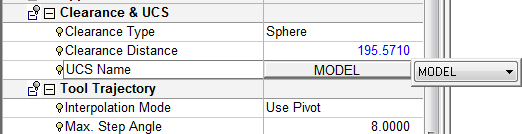
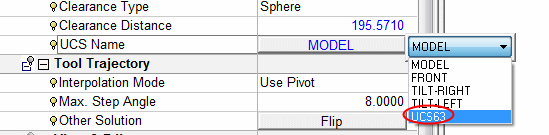
Click on the UCS Name parameter as shown in the following image:
-
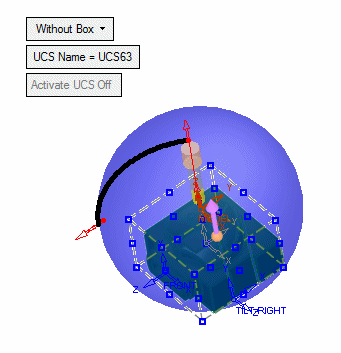
Select Wireframe > Datum > UCS Center of Geometry.
-
Drag a box around the entire geometry and click the Middle Mouse Button to accept the selection.
-
Click OK in the Feature Guide.
-
Select the UCS from the UCS Name dropdown list.
-
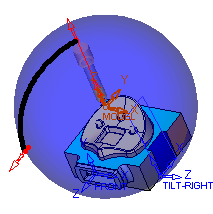
Change the Clearance Distance to 160.

-
Save & calculate the procedure.
-
Copy/Paste the Connection procedure after the first and second Rough procedures.
-
Rerun both Connection procedures.
When the previous or next procedure is changed or when you want to change the connection definitions, the Connection procedure can be re-executed to automatically adapt itself to the new situation.
A tool change commandtool change command is automatically created due to the previous and next procedures using different tools.