|
|
Edit Multiple Cutters
-
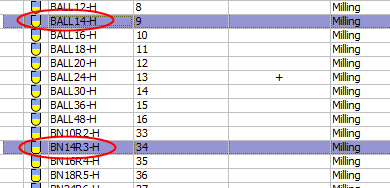
Select both the BALL14-H and BN14R3-H cutters.
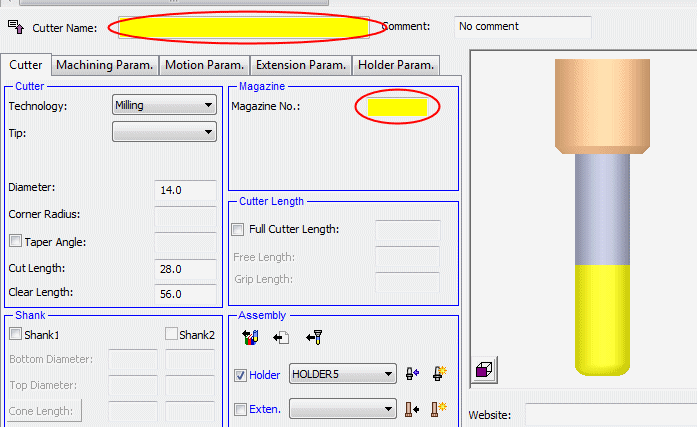
When multiple cutters are selected, common parameter fields that have different values are highlighted in YELLOW.
-
Change the parameters as indicated in the following image.
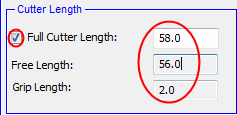
Mark the Full Cutter Length checkbox and change the Full Cutter Length to 58.
-
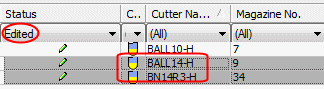
Both procedures are shown with the Edit icon. Use the Edited filter to display only the edited cutters.
-
Select the last two cutters.
-
Right-click and select Revert Changes.
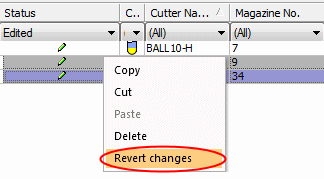
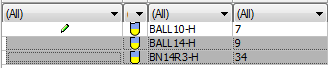
The parameters were reverted and the two last cutters no longer display the Edit icon.
-
Select BALL 10-H.
Click OK or double-click the selected cutter to approve the selection and return to the procedure dialog.

You cannot use the Cutter Table to edit a procedure you are in. The parameters are grayed out.
Open the Cutter Table from the Guide to edit a cutter that is in use. When you apply changes, the system notifies you that the procedure using the edited cutter will be suspended.
Another way to edit a used cutter from within a procedure is to duplicate the cutter and update the parameter you wish to change. -
ExitExit
 the procedure without saving.


