|
|
Interaction - Part 2
Step 15 - Feature Guide
Editing functions and a Solid building function will now be used.
-
Verify the sketch is selected and enter the Extrude function using one of the following methods:
- Click on the right mouse button and select ExtrudeExtrude.
- Choose Solid > Main Tools > ExtrudeSolid > Main Tools > Extrude.

- Click on the right mouse button and select ExtrudeExtrude.
-
The Extrude Feature Guide is displayed:
- The top line in the Feature Guide specifies the RequiredRequired features necessary to create an extrude.

Note: In Cimatron, all Feature Guides have Required elements, which must be filled in before the feature can be executed.
- The Contour/Sketch Selection icon (circled) is already marked with a check because the highlighted sketch was automatically chosen.
- The Options and Parameters icon indicates this step must be confirmed before the extrude can be performed.
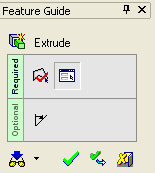
- The bottom line in the Feature Guide specifies the OptionalOptional features for an extrude.

Note: The Optional line in the Feature Guide does not appear for every feature in Cimatron.
- The top line in the Feature Guide specifies the RequiredRequired features necessary to create an extrude.


