|
|
Finish Parallel Order
-
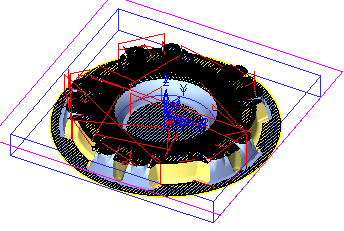
Load the Finish_Parallel_By_Pass.elt file.
-
Double-click the procedure.
Note that the Horizontal Machining Method is Parallel and the Horizontal Machining Order is set to By Closest, which is the default option. -
Click Navigator and click Next Block.
When an obstacle is encountered during machining, the machining continues either along the same pass or on a different pass, whichever is closest.
In the following image, the tool moves along the direction indicated by the arrow.
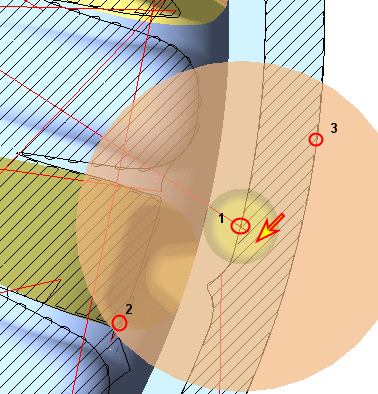
When it reaches the vertical wall (point 1), it may retract and continue in the same pass to point 2 or continue to the closest pass (in this example, point 3).
Note that the tool continues its movement to point 3 as it's closer than point 2. -
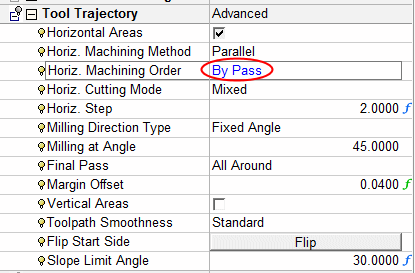
Re-run the procedure and set the Horizontal Machining Order option to By PassBy Pass.
-
The tool now retractsretracts when it reaches point 1 and continues to point 2.
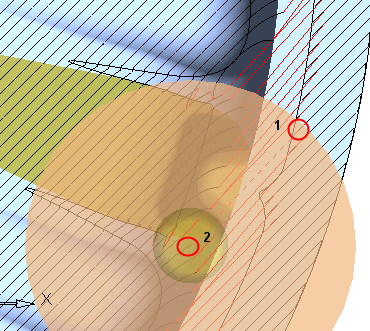
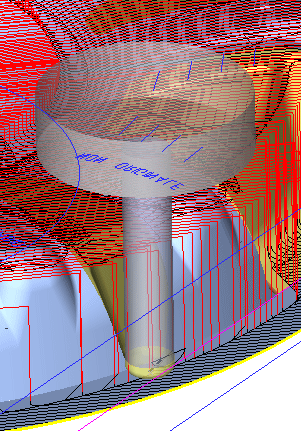
The By Closest option offers a faster toolpath. However, sometimes it can occur that at a certain stage in the toolpath, the tool returns to the next pass in a certain section after a long time. As a result, there may be a line mark on the material.
Therefore, for better quality surfaces use the By Pass option. Otherwise, use the By Closest option.


