|
|
Geodesic 4
-
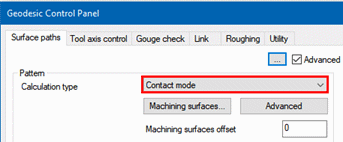
Edit the procedure and set the Calculation type to Contact mode.
-
Save & Execute the procedure and use the Navigator to examine the results.
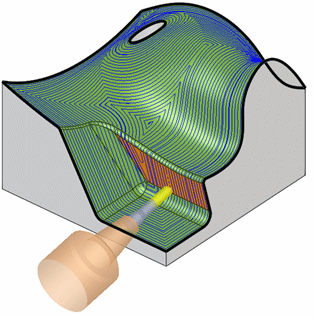
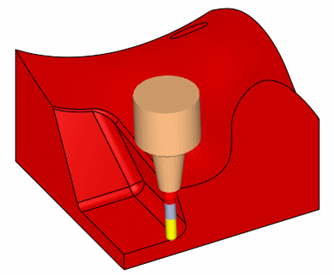
Notice that the stepover seems to be equal. This time, the stepover was calculated on the machined surfaces themselves. While on the undercut area, the tool holder is colliding. In addition, it is in an aggressive tilted orientation, which may be problematic for the machine to reach.
-
These aggressive orientations can be prevented.
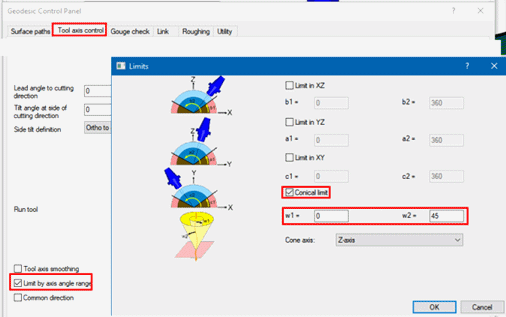
- Edit the procedure and open the Tool axis control tab.
- Mark the Limit by axis angle range option.
- Open the Limits dialog and set a Conical limit, between 0° and 45°.
-
Save and Execute the procedure and simulate without stock to examine the results.
There will be quite a few gouges and a few shank collisions.-
The collisions are easily understood.
-
The gouges may be caused by the fact that the motions are calculated on the surfaces (Contact mode) and later on the tool is being tilted around its tip, to respect the required orientation.
-
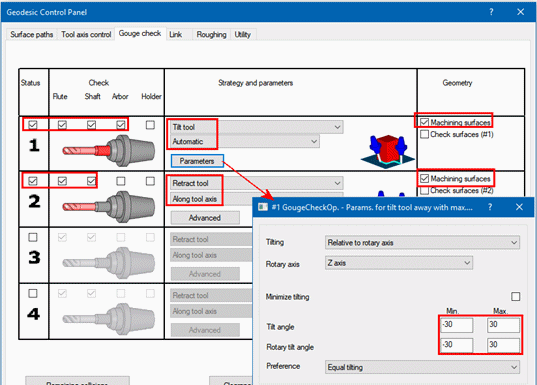
- Gouge/collision issues can be solved by using the familiar setting options in the Gouge check page.
Edit the procedure.
COnfigure the settings as shown in the following image and recalculate to get a gouge/collision free toolpath.