|
|
Step 4 - Link
Link
-
Edit the procedure.
-
Select the Link tab. Press the Retracts button.
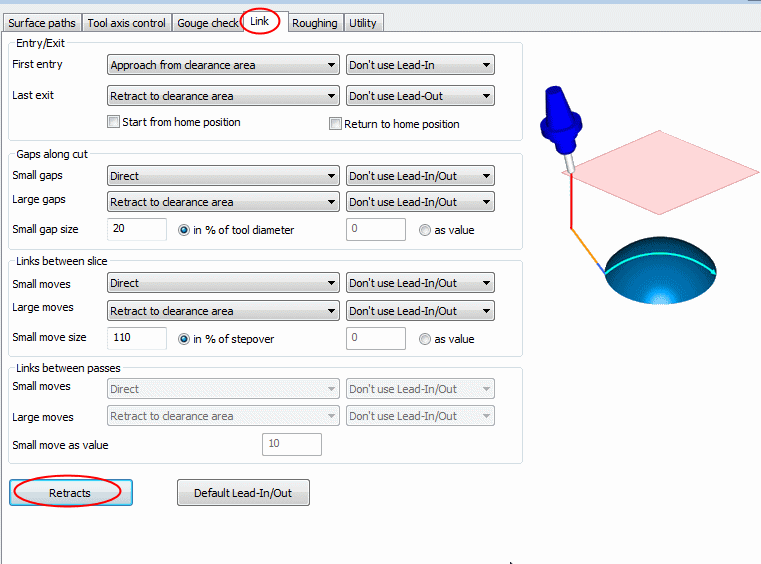
-
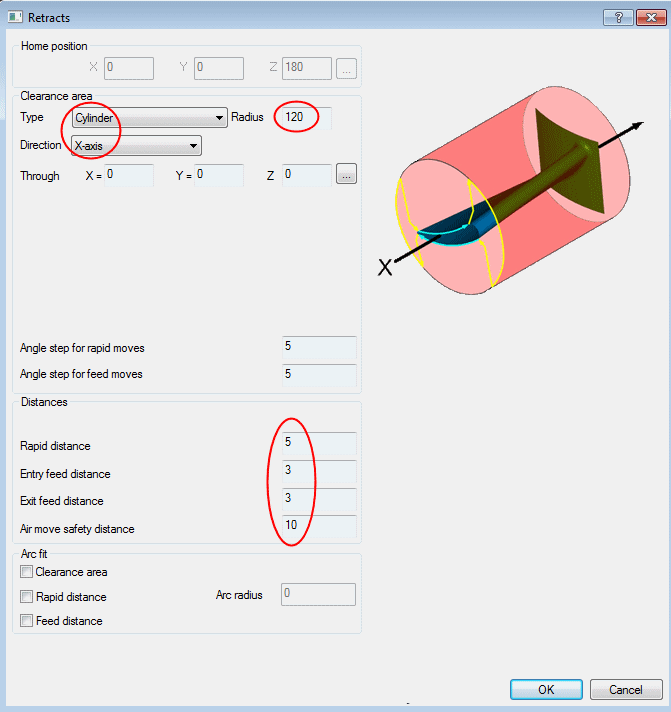
Set the Clearance Type and Direction to Cylindrical and - X-axis.
-
Define the Radius at 120.
-
Apply the distances as shown below.
Set Rapid Distance to 5 and both Entry Feed Distance and Exit Feed Distance to 3.
-
Execute and view the results.

There are different options to define the clearance shape. In this case, it will be a cylinder of 120 mm radius with the center passing through the UCS origin point (through X=0 Y=0 Z=0). The options are described as follows:
-
Feed Distance: Last approach motion towards the material. In Cimatron, this motion would be the Delta_Z_Up or Surface Normal motions.
-
Rapid Distance: Last rapid motion before the first feed motion. Performed in the same direction.
-
The rapid motions bypassing the check surfaces have a cylindrical shape.
Notice that the created cylindrical motions are performed in a radius of 210 mm and not 120 as defined. The system will calculate the minimal safe distance needed to not gouge any geometry. The search for a new safe height is performed in steps of 10 mm as defined in the Air Move Safety Distance parameter.


