|
|
Mill All
All areas of the Mill All.elt file will now be machined.
-
Create a new toolpath, accept the default values, and load the Mill All.elt file located in the following folder:
-
Copy and paste the Finish procedure into the second toolpath.
-
Edit the procedure, reset the boundary selection, and pick the boundary shown in the following image:
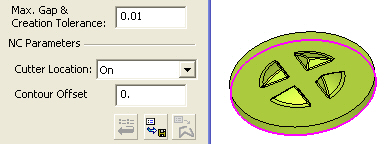
-
Reset the Check Surfaces selection.
-
Reset the Part Surfaces selection and select all Part Surfaces from the Mill All part, except for the one indicated in the following image:
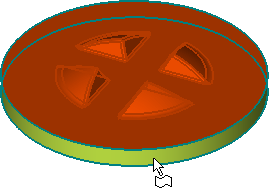
-
Unmark the Vertical Areas checkbox.
-
Save and calculate the procedure.
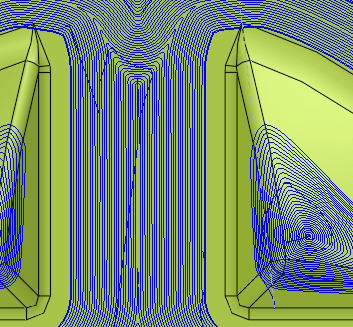
-
Edit the procedure, change the procedure type to Finish Mill All, and mark the True Spiral checkbox.
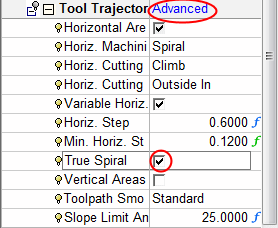
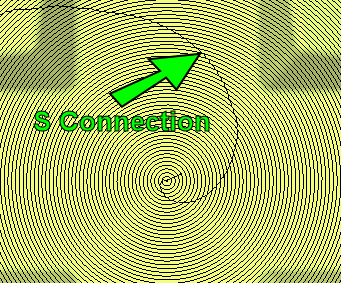
The difference between true spiral and spiral toolpaths is the connection between the offsets.
-
A spiral toolpath has an S connectionS connection between the offsets.
-
A true spiral toolpath does not have any connection between the offsets, as a true spiral is created. A true spiral toolpath decreases milling time.
-
- Save and calculate the procedure.
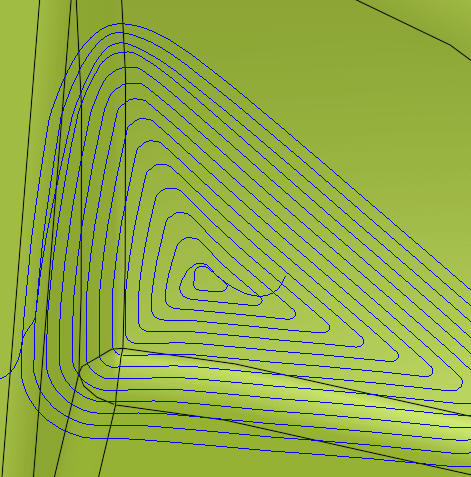
Finish Mill All technology is used on models with small horizontal geometric variations.


