|
|
Motion Parameters - Access
-
Under the Motion Parameters, select the Access button to access the 5X Production Pro Control Panel dialog.
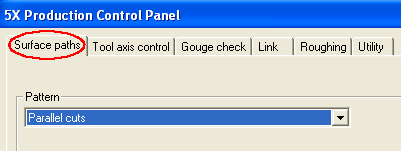
The first tab in the dialog is Surface Paths. This is the first logical step in the definition as described in the Introduction step.
-
Select the Parallel Cuts as the Pattern for the machining strategy.
-
Set the Angle in X, Y to 0 and the Angle in Z to -90.
The angle on the XY plane (0 deg) in 5X Advanced Pro is in the Y+ direction.
The Measuring Angle in Z option, in this case, is the angle on the ZX plane and is set to -90. This means motions will start from the right side and advance to the left. Generally, this angle will be performed on a plane normal to the above set XY plane.