|
|
On Machine Inspection 6
-
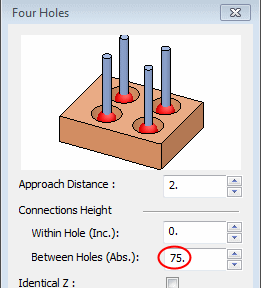
Set the Between Holes parameter to 75 to ensure it is above the ridge top.
-
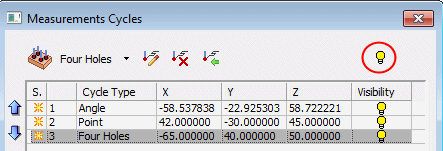
Click OK. The Four Holes row was added to the dialog.
In general, functionality of the On Machine Inspection procedure enables multiple measurements in a simpler way than defining multiple separate measurement procedures. The user is supposed to add more cycles, according to the measurements he wants to perform.
As more cycles are added, the display is populated with probe figures and arrows.
-
The bulbbulb
 on the right of each row hides or shows the relevant probe.
 -
The bulb button at the top of the dialogtop of the dialog hides/shows the probes for all selected cycles.
-
Cycle row selection can be done one at a time. Multiple rows can be selected using the Ctrl or Shift keys.
-
The 3 buttonsThe 3 buttons on lower left corner of the dialog: Select All Items, Clear Selection, and Toggle Selection can assist with multiple row selection.

-
The blue Up/Down arrowsUp/Down arrows on the left side of the dialog are used to move selected cycle(s) up or down to reorder the list.

-
The 3 controls3 controls at the top of the dialog enable the following (left to right): Edit Cycle, Delete Cycles, and Import from CMM file. The CMM file is the one that was pre-defined by the CAD engineers.


