|
|
Screen Options
Step 7 - ZPR
As discussed in step 4, the right mouse button opens the screen optionsscreen options popup submenu. There are other picture options available via this submenu, which will be discussed below:
The following functions are also available in the View > ZPR menu:
-
Zoom All (also available by clicking on the Zoom All iconZoom All icon
 in the Icons toolbar)
 -
Zoom Window (also available by clicking on the Zoom By Box iconZoom By Box icon
 in the Icons toolbar)
 -
Zoom Selection (also available by clicking on the Zoom to Selection iconZoom to Selection icon
 in the Icons toolbar)
 -
Rotate to Plane
-
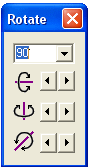
Rotate by Angle (This option enables viewing the picture by a fixed angle around the X, Y, or Z axis.)