|
|
Editing and Controlling Motions: Motion Editor
The Motion Editor is a special environment holding a set of tools, enabling manual toolpath modifications. The Motion Editor tools are:
-
Project portions of the toolpath on selected surfaces (Z direction projection).
-
Delete/Trim by Contour (any direction)/Trim by Plane portions of the toolpath.
-
Add/Modify Entry/Exit and Air-Connections.
-
Check Gouges of modified Entries/Exits or Air Connections or any other toolpath portion.
-
Cancel Changes and Restore the Original Toolpath.
All of the above operations work in combination with the Navigator and its display options.
Purpose
In order to perform the correct toolpath, many conditions need to be fulfilled. These include:
-
The algorithm must have the ability to provide the correct functional answer.
-
The user must make the right decisions using the optimal functions/parameters.
However, there always will be the need to:
-
Modify the results in order to overcome all kinds of problems/special requests along the way.
-
Overcome algorithmic/geometric problems.
-
Overcome user errors when choosing parameters.
-
Support changes in the input data (ECO) or in the process.
-
Address special cases/requests.
-
Add flexibility to the system.
Project
The Project tool enables the user to project a toolpath on a set of surfaces.
-
Load the 0_nc_clips.elt file.
-
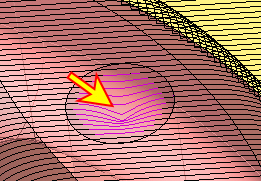
Change the Display mode to Transparency mode. Zoom-in to the hole’s areas. Notice the toolpath; the motions are falling into the hole.